
Know what matters.
Focus on what’s next.
TIBLR brings your team’s objectives, priorities, and tasks together, turning everything that needs to get done into a clear path forward.

Objectives, priorities, and tasks
in one place.
Most teams keep their goals in one tool, their work in another, and the conversation about both somewhere else. Together, deciding what to do next stops being guesswork.
Objectives set the direction
Company and team objectives with measurable key results, linked to the tasks that move them. Progress is a by-product of doing the work, not a separate reporting exercise.
Priorities decide the order
Every task has one owner, a due date, and the objective it serves. So “what should I do next” has an answer you can point at rather than argue about.
The team stays aligned
A short daily review keeps the list true, and your 1:1s and team reviews run off that same work — so what gets agreed becomes a task, not a note.
Everyone sees only what’s next
Alignment only holds if it costs the team almost nothing. Each person gets one short review of what needs a decision today — not another board to maintain.
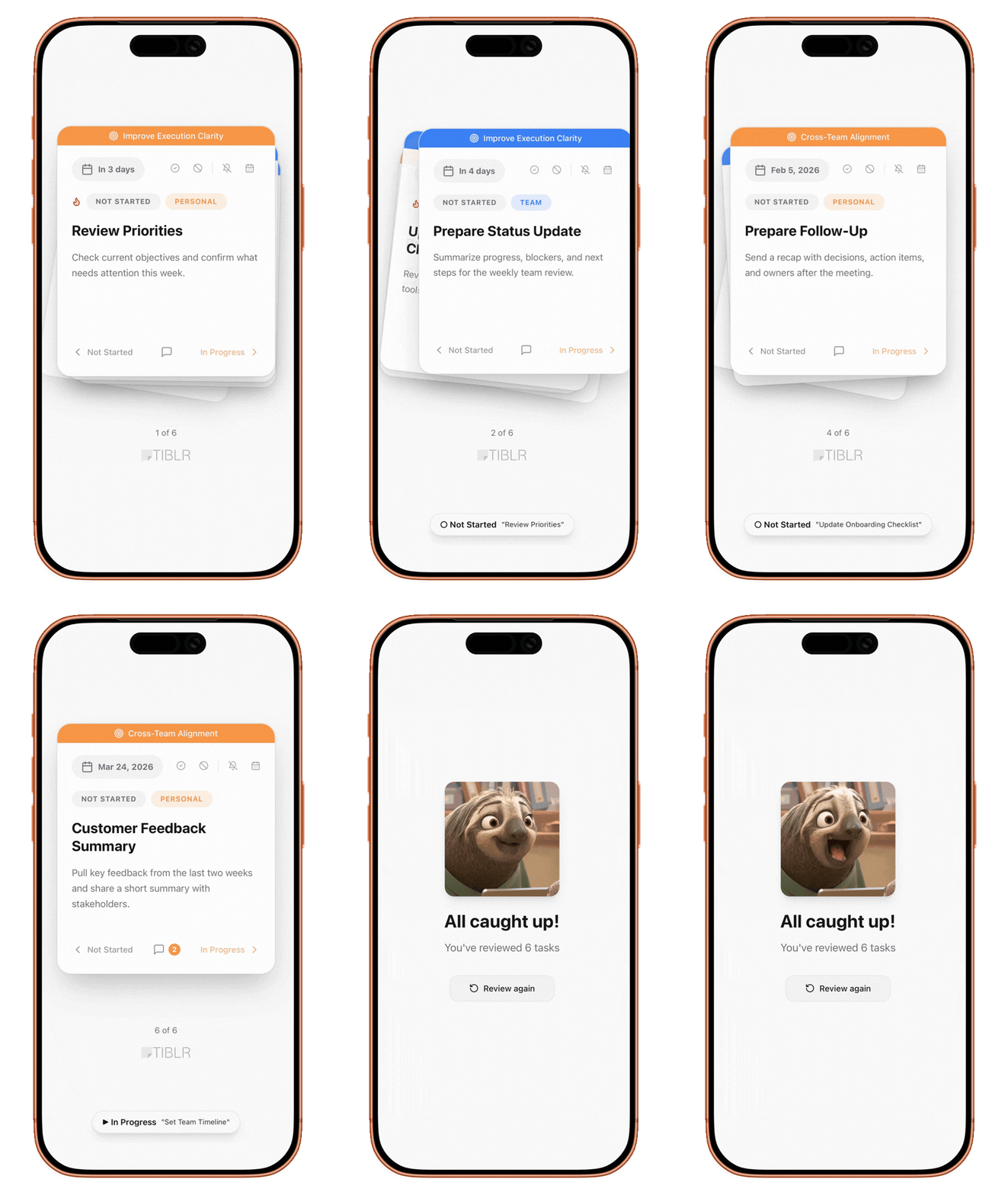
Quick Daily Review
Spend 30-seconds reviewing your stack each morning. Know exactly what needs your attention.
Personal & Team Tasks
Keep personal to-dos separate from team work. Two task types, one unified view.
Accept or Push Back
Assigning work isn't the same as agreeing to it. Every task waits for an explicit yes, so nobody is quietly volunteered.
Solutions for every role.
Powered by one platform.
The manager runs the cadence. Everyone else gets a short daily review and a clear answer to what they owe.
Lead your team with clarity, not check-ins
See who's working on what, spot blockers before they escalate, and run 1:1s that actually move things forward — all without asking "what's the status?"
- Live view of who is carrying what
- Blocked and stale work flagged automatically
- One-click Meeting Mode for focused reviews
- Objective-linked tasks for strategic alignment
Everything the work needs
Objectives the tasks roll up to, work captured wherever it arrives, and meetings that read from the same list everyone already works from.
Objectives & OKRs
Strategy that reaches the work
Most goal tracking lives in a document nobody opens. In TIBLR, objectives are attached to the tasks themselves — so progress is a by-product of doing the work, not a separate reporting exercise.

My Stack
Focus on what matters. Clear your stack in 30-seconds with left and right swipes.
- Review in seconds
- Swipe to complete
Email Assistant
Schedule emails to return at the perfect time. Never forget to follow up. TIBLR brings them back when you need them.
- Schedule email returns
- Convert to tasks instantly
- Skip if already replied
Meeting Mode
Run better team syncs. Categorize tasks by activity, identify what needs attention, and keep meetings focused.
- Sort by activity level
- Flag blocked items
- Time-boxed reviews
Slack Integration
Turn Slack messages into tasks without leaving your workflow. Capture action items as they happen.
- Create tasks from messages
- Get task notifications
- Assign to teammates
Gmail Chrome Extension
Convert emails to tasks with one click using our Chrome extension. Never lose an action item again.
- Chrome extension
- One-click capture
- Link back to email
Up and running in minutes
Not a rollout. No implementation call, no configuration project — invite your team, add the work you already have, and go.
Add Tasks
Capture tasks from anywhere — Slack messages, emails, or create them directly. Assign to yourself or your team.
Swipe Your Stack
Your daily 2-minute review. Swipe through tasks, accept what's yours, push back what's not.
Stay in Sync
Use Meeting Mode for team check-ins. Everyone knows what's done, blocked, and what's next.