TIBLR SMS Program
Last updated: March 4, 2026
Opt-In Disclosure (Call to Action)
This section documents the exact consent language displayed to users when they opt in to SMS notifications. It serves as public verification of TIBLR's SMS consent flow.
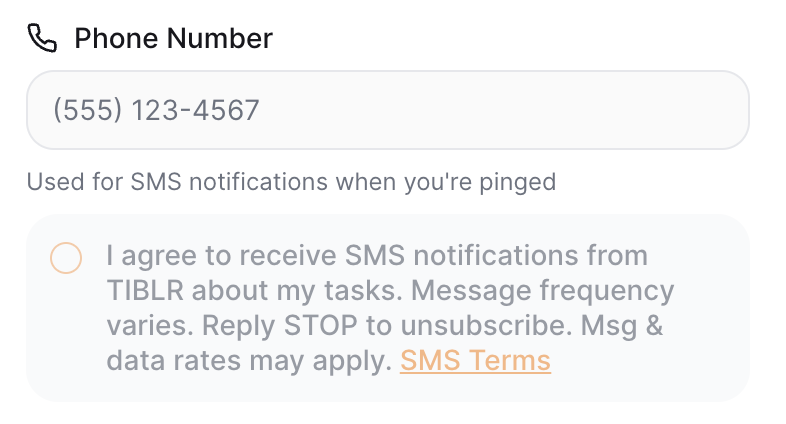
"I agree to receive SMS notifications from TIBLR about my tasks. Message frequency varies. Reply STOP to unsubscribe. Msg & data rates may apply."
Users provide consent at: https://tiblr.lovable.app/profile (authenticated account settings — requires login). The consent checkbox is disabled until a valid phone number is entered, and the user must click "Save Changes" to complete opt-in.
Program Overview
TIBLR is a SaaS team task management platform. Managers assign tasks to team members and track progress. When a manager "pings" a teammate for a task update, the system sends a one-time SMS notification containing the teammate's first name, the requester's name or role, the number of open tasks, and a short login link. SMS is used because pings are time-sensitive nudges that benefit from immediate delivery outside the app.
How to Opt In
SMS notifications are entirely opt-in. To enable them, users must complete all of the following steps in their account profile settings:
1. Add a phone number
Enter a valid US mobile phone number in your profile settings.
2. Check the consent checkbox
Explicitly agree by checking the box that reads: "I agree to receive SMS notifications from TIBLR about my tasks. Message frequency varies. Reply STOP to unsubscribe. Msg & data rates may apply."
3. Save changes
Click the "Save Changes" button to confirm your opt-in.
The consent checkbox is disabled until a valid phone number is entered. Users cannot receive SMS notifications without completing all three steps.
Opt-In Screenshot
Below is a screenshot of the SMS opt-in interface as it appears in the user's profile settings:
Sample Messages
Here are examples of the SMS messages you may receive:
Hey Sarah! Mike needs a task update at TIBLR. 3 open. Login: https://tiblr.com/r/a1b2c3
Hey John! Your manager needs a task update at Acme Corp. 1 open. Login: https://tiblr.com/r/x7y8z9
Message Frequency
Message frequency varies based on your team's activity. You will only receive SMS messages when a teammate specifically pings you about a task. Typical usage is 1–5 messages per week, though this may vary.
How to Opt Out
You can stop receiving SMS notifications at any time by:
- Replying STOP to any SMS message from TIBLR
- Unchecking the SMS consent checkbox in your profile settings
- Removing your phone number from your profile
Need Help?
Reply HELP to any SMS message for assistance, or contact us at support@tiblr.com.
Message & Data Rates
Message and data rates may apply. Check with your mobile carrier for details about your text messaging plan.
Supported Carriers
SMS notifications are available on all major US carriers including AT&T, Verizon, T-Mobile, Sprint, and most regional carriers. Carriers are not liable for delayed or undelivered messages.
Related Policies
For questions about this SMS program, contact us at support@tiblr.com.